

1. There are 3 home navigation styles included:
a) Home with Navigation Drawer (default)
b) Home with Top Tabs
c) Home with Bottom Tabs
and Demo Home version
If you want to use Home with Navigation Drawer, don’t change anything and skip to next step.
If you want to use Home with Top Tabs, Bottom Tabs or Demo Home, open manifest.xml in folder app > manifests and move intent filter to your home activity:
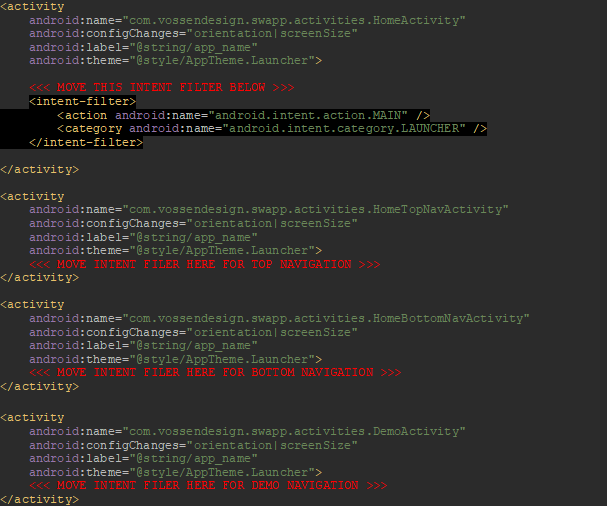
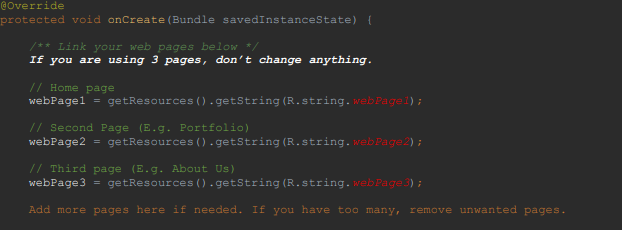
2. If you are using Home with Navigation Drawer, open
HomeActivity.java in folder app > java > com.vossenthemes.swapp > activities
and connect your web pages you have linked in your strings.xml.
If you are using Home with Top Tabs or Bottom Tabs instead, open folder
app > java > com.vossenthemes.swapp > activities > fragments.
There are HomeFragment1, HomeFragment2 and HomeFragment3.
One HomeFragment is one webpage tab in Top Tab or Bottom Tab.
If you are using exacly 3 pages, skip this step.
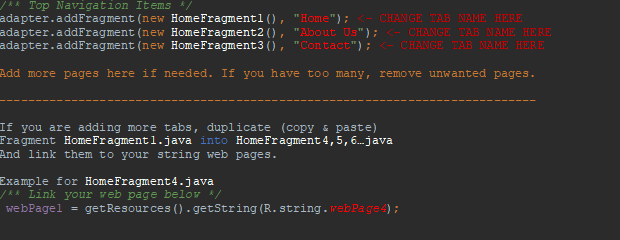
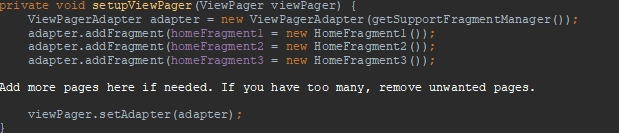
If you want more or less than 3 pages, open and change:
For Top Tabs: HomeTopNavActivity.java (folder java > activities)
For Bottom Tabs: HomeBotNavActivity.java (folder java > activities)

For Demo Home version: DemoActivity.java (folder java > activities)