

1. Changing Actionbar (Toolbar) menu
Open main.xml in folder app > res > menu.
Currently there are 2 items: share and refresh.
You can change them and add more items as well.
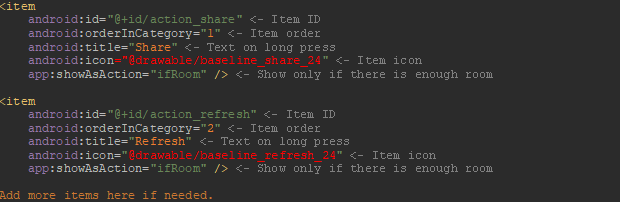
Once you have items to your liking, open your homepage file (HomeActivity, or HomeFragment1,2,3 for Home with Top Tabs / Home with Bottom Tabs) and find onOptionsItemSelected.
Here you can change your item funcions. Just make sure that main.xml and onOptionsItemSelected have the same number of items and same IDs.
If you want to add some different functions, go to HomeActivity and find onNavigationItemSelected. Select the action you want and copy&paste it into onOptionsItemSelected in your home activity.
2. Changing Home with Drawer or Home with Bottom Tabs menus
For Home with Navigation Drawer (drawer menu) and Home with Bottom Tabs (bottom menu), we use the same method as in step 1.
Home with Navigation Drawer:
Open activity_home_drawer.xml in folder app > res > menu.
Change it to your liking, then open HomeActivity.java and change onNavigationItemSelected to match your item actions.
Home with Bottom Tabs:
Open activity_homebottomdrawer.xml in folder app > res > menu.
Change it to your liking, then open HomeBottomNavActivity.java and change bottomNavigationView.setOnNavigationItemSelectedListener to match your item actions.