

1. First you need to rename packages.
In your Project panel, click on the little gear icon.
2. Uncheck / De-select the Compact Empty Middle Packages option

3. Your package directory will now be broken up in individual directories.
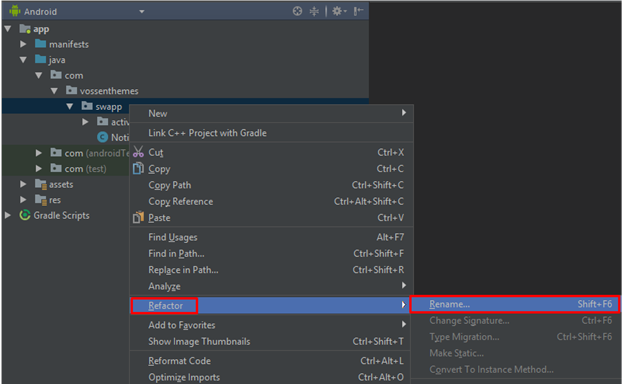
4. Individually select each directory you want to rename, and:
• Right-click it.
• Select Refactor.
• Click on Rename.
• In the pop-up dialog, click on Rename Package.
• Enter the new name and hit Refactor.
• Click Do Refactor in the bottom section.
• Allow a minute to let Android Studio update all changes.
5. Go to file build.gradle (Module: app) in folder Gradle Script.
Update the applicationId in the defaultConfig to your new Package name and click Sync Now in top right corner, if it hasn't already been updated automatically.

6. Open AndroidManifest.xml in app > manifests and change package= attribute if it hasn’t already been updated automatically.

7. Go to Build > Clean then Rebuild Project. Now you can set back Compacy Empty Middle Packages from step 1.
8. If everything is ready, you can publish your app.
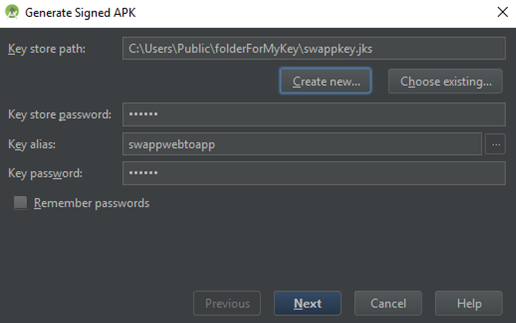
Go to Build > Generate Signed APK… and fill in your details, select location for your key and write your key password.
9. Publish on Google Play Store.